Updates Happen!
.
  • Blog
  • Home
  • About
  • TIPS
  • LanSchool
  • Run Updates
  • Teacher Laptop
  • PTC set up
  • Lockdown form instructions

Edge... shm

10/31/2023

0 Comments


Are your links opening in Edge?

Wait - What is Edge? 
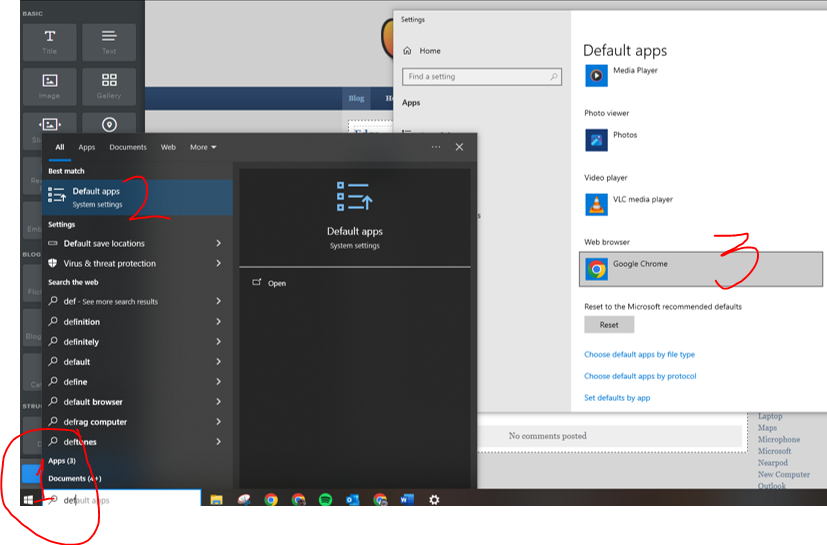
Edge is Microsoft's new browser that replaced IE a few years ago.  Being the Google people that we are we have gotten used to our bookmarks and how Chrome works along with our school Google products.  But if you click on on a link sent to you in an e-mail Outlook may be opening that link in Edge.  First be sure Chrome is your default browser on your PC.
  1. At the Windows icon on the bottom left starting typing "default apps"
  2. Click on "default apps
  3. Scroll down to "Web Browser" and be sure it is the browser of your choice.
Picture

Outlook is a Microsoft product and...!

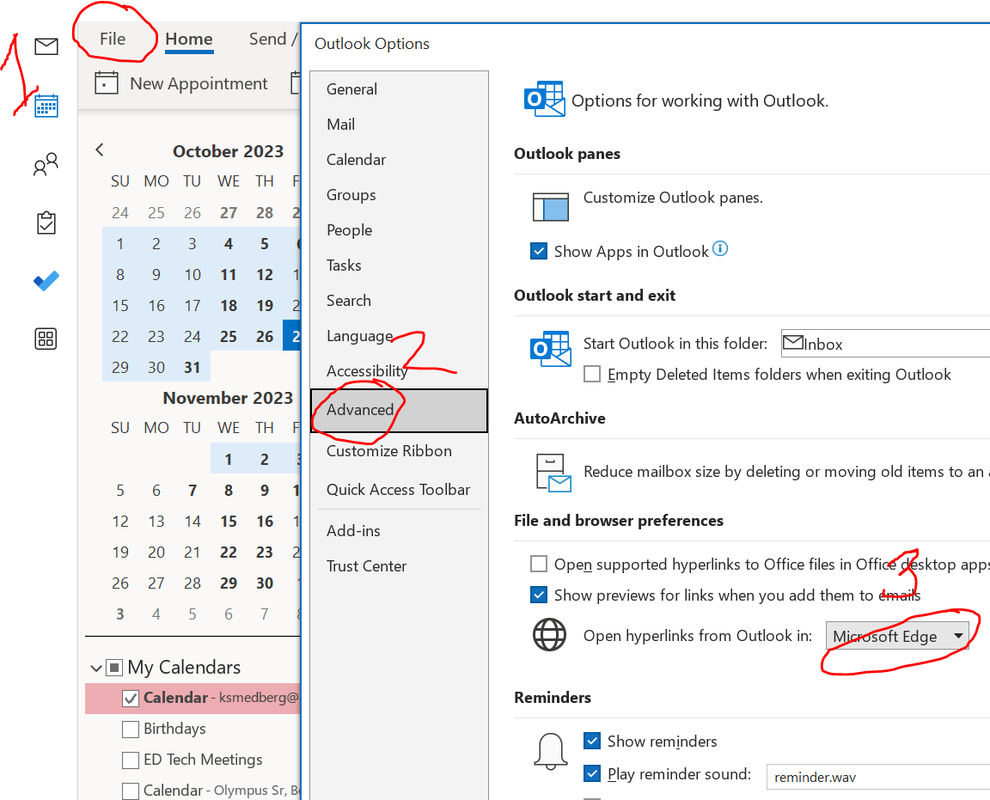
  1. Open Outlook and click on File
  2. Click on "Advanced"
  3. Scroll down to "open hyperlinks from outlook to..." Change it to
    "default browser"  Click OK.

​You're welcome! ;)
Picture
0 Comments


Leave a Reply.

    Categories

    All
    2021
    Adobe
    Arts & Culture
    Boxlight
    Bulletin
    Canvas
    Cheating
    Chrome
    Copyright
    Destiny
    Display
    Distance Learning
    Enhanced
    Flipped
    Focus
    Google
    Granite
    IOS
    Lanschool
    Laptop
    Maps
    Microphone
    Microsoft
    Nearpod
    New Computer
    Outlook
    PickAtime
    PTC
    Safari Montage
    Scan
    ScreenCastify
    Settings
    Software
    Teams
    Troubleshooting
    Tuesday
    UEN
    Updates
    Video
    Weebly
    WelcomeBack2020
    Zoom

Powered by Create your own unique website with customizable templates.
Photo from focusonmore.com